 It’s been 2 months now since I first opened the doors to my Jibe world.
In that time, I’ve had 1,269 different people visit it.
To everyone who has visited, thank you. And to those of you who haven’t visited yet, I hope you stop by someday soon!

It’s been 2 months now since I first opened the doors to my Jibe world.
In that time, I’ve had 1,269 different people visit it.
To everyone who has visited, thank you. And to those of you who haven’t visited yet, I hope you stop by someday soon!
 Jibe 1.3 has been released by ReactionGrid!
In addition to a bunch of bugfixes and new features, we’ve now added the ability for avatars to fly.
To celebrate, I imported a model of the Space Shuttle Orbiter and placed it in the sky of my own Jibe world. To visit it, just fly up! And to learn how I set it up, read on…
 ISTE SIGVE (International Society for Technology in Education – Special Interest Group for Virtual Environments) is a group of educators, administrators, and educational technologists who are interested in the development of 3D Virtual Environment platforms for connection and collaboration.
They hold online meetings each month, and on May 17th they invited me to speak to their group about Jibe and Virtual Worlds on the Web.

GAMBIT is a collaboration between the Massachusetts Institute of Technology and the government of Singapore, created to explore new directions for the development of games as a medium. The lab focuses on the creation of video game prototypes to demonstrate their research as a complement to traditional academic publishing.
Tomorrow (Friday) at 4pm Eastern, Chris Hart (ReactionGrid CTO) and I will be at the GAMBIT lab at MIT to talk about Jibe!
More details can be found on the GAMBIT blog.
There will be a live video stream of the presentation, so you can also tune in to watch.
UPDATE 5/24/11: Here’s a recording of our presentation.
-John “Pathfinder” Lester
 We all share a common physical reality. A leaf gently falling from a tree, a chilling breeze, a startled rabbit running across a field. We experience these things in the physical world and know that others experience them the same way at the same moments in space and time.
But what if you could change that? What if you could customize reality so that different people perceive things happening in the world differently?
We don’t have this ability the physical world. But it can be done in virtual worlds.
 I like to write tutorials to help people learn how to do things with Jibe and Unity3d, and you can find them all on my blog. But sometimes it’s easier to learn by joining a live tutorial. Doing it live also lets people ask questions during the tutorial.
I host Live Tutorials using a web-based screen-sharing application called Join.me. Just go to my Join.me page in your web browser and you can jump right in without having to download any software. Once you’re in the meeting, you’ll be be added to a Skype conference call so we can communicate using voice.
My Live Tutorials are open to everyone, and each week I’ll be teaching people how to use Jibe and the Unity3d editor to do something new.
More information about my Office Hours and Live Tutorials (including a calendar of scheduled events) can be found here.
And be sure to watch the #ReactionGrid hashtag on Twitter for special announcements!
If you’d like to schedule a time for a personal tutorial to learn more about Unity3d and Jibe, you got it! Just email me at pathfinder@reactiongrid.com and let me know what day/time works for you. We can meet using my Join.me page and I can walk you through whatever you’d like to learn. Beginners welcome!
-John “Pathfinder” Lester
 I’ve been playing a lot of Portal 2 lately, and one of my favorite elements from the Portal series is the lovely Weighted Companion Cube.
Today we’ll explore how to create a Companion Cube in Jibe and Unity3d that will spin and speak to you when you click on it.
 At ReactionGrid, we have a Community Virtual World Wiki that anyone can use to find information or add their own content.
In a recent discussion on our Jibe-Unity3d Google Group, some folks were interested in organizing and sharing information they’ve learned on how to get started with Jibe and Unity3d.
Our Google Group is the best place to have ongoing discussions and share ideas about Jibe, but the right tool for the job of organizing content is definitely our Wiki.
So here’s a crash course on how to use it!
 Here at ReactionGrid, we love it when people ask us questions about Jibe (our multiuser virtual world platform based on Unity3d). Jibe is a rapidly evolving platform, and the most innovative ideas for both using and improving Jibe always come directly from our users. Which is why we encourage everyone to submit questions and new feature ideas via the ticket system on our support portal.
Today I saw a ticket from a new Jibe user asking if it was possible to create a flying camera tour in their Jibe world. They wanted people to be able to click something and have their avatar’s camera fly around on a predefined tour path through their Jibe world.
We include in our Jibe platform a Presentation Screen System that lets people automatically set their camera view when they sit down to watch a slideshow or video presentation. And with a few tweaks, you can use the scripts from this system to easily create a flying camera tour experience.
Here’s how to do it.
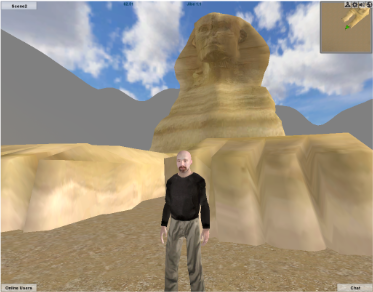 Google Warehouse is a fantastic resource for free 3d models. And it’s especially fun to hunt for models of beautiful historical landmarks that you can pull into your own multiuser virtual world.
Today we’re going to bring a model of the Great Sphinx of Giza from Google Warehouse into a multiuser Jibe world using Unity3d. And we’ll script the Sphinx so it asks a riddle when any avatar walks up to it.
 Be Cunning and Full of Tricks