Unknown's avatar

About John "Pathfinder" Lester

Cypherpunk Capitalist | Crypto | InfoSec | NFT Communities | Metaverse | Culture | Fashion | Art | Identity

How to create a “flying camera tour” in Jibe and Unity3d

Here at ReactionGrid, we love it when people ask us questions about Jibe (our multiuser virtual world platform based on Unity3d).  Jibe is a rapidly evolving platform, and the most innovative ideas for both using and improving Jibe always come directly from our users.  Which is why we encourage everyone to submit questions and new feature ideas via the ticket system on our support portal.

Today I saw a ticket from a new Jibe user asking if it was possible to create a flying camera tour in their Jibe world. They wanted people to be able to click something and have their avatar’s camera fly around on a predefined tour path through their Jibe world.

We include in our Jibe platform a Presentation Screen System that lets people automatically set their camera view when they sit down to watch a slideshow or video presentation.  And with a few tweaks, you can use the scripts from this system to easily create a flying camera tour experience.

Here’s how to do it.

Continue reading

The Riddle of the Sphinx: Using Google Warehouse models in Jibe and Unity3d

Google Warehouse is a fantastic resource for free 3d models.  And it’s especially fun to hunt for models of beautiful historical landmarks that you can pull into your own multiuser virtual world.

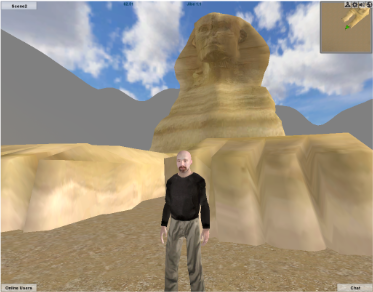
Today we’re going to bring a model of the Great Sphinx of Giza from Google Warehouse into a multiuser Jibe world using Unity3d.  And we’ll script the Sphinx so it asks a riddle when any avatar walks up to it.

Continue reading

Interactivity in Virtual Worlds: Using Triggers in Jibe and Unity3d

The physical world around us is responsive to our presence.

The same experience can be recreated in virtual worlds.

You just have to learn a few new tricks.

Those of us designing virtual worlds want to make them as engaging and interesting as possible.  There are many different ways to accomplish this goal.  You can start by creating a visually interesting space.  Make it beautiful to look at.  Fill it with things that move and look alive.  Encourage exploration by rewarding people with fun things to discover.  And never forget the power of sounds.

All of these methods will help you design a virtual space that is engaging to visitors.  But at some point you’ll realize that you want to build a world that is responsive to the people who are exploring it.

Looking and listening is fun.  Interactivity is even better.

Continue reading

Hypergrid Adventurers Club – Visiting a recreation of the astronomical observatory at Pic du Midi de Bigorre

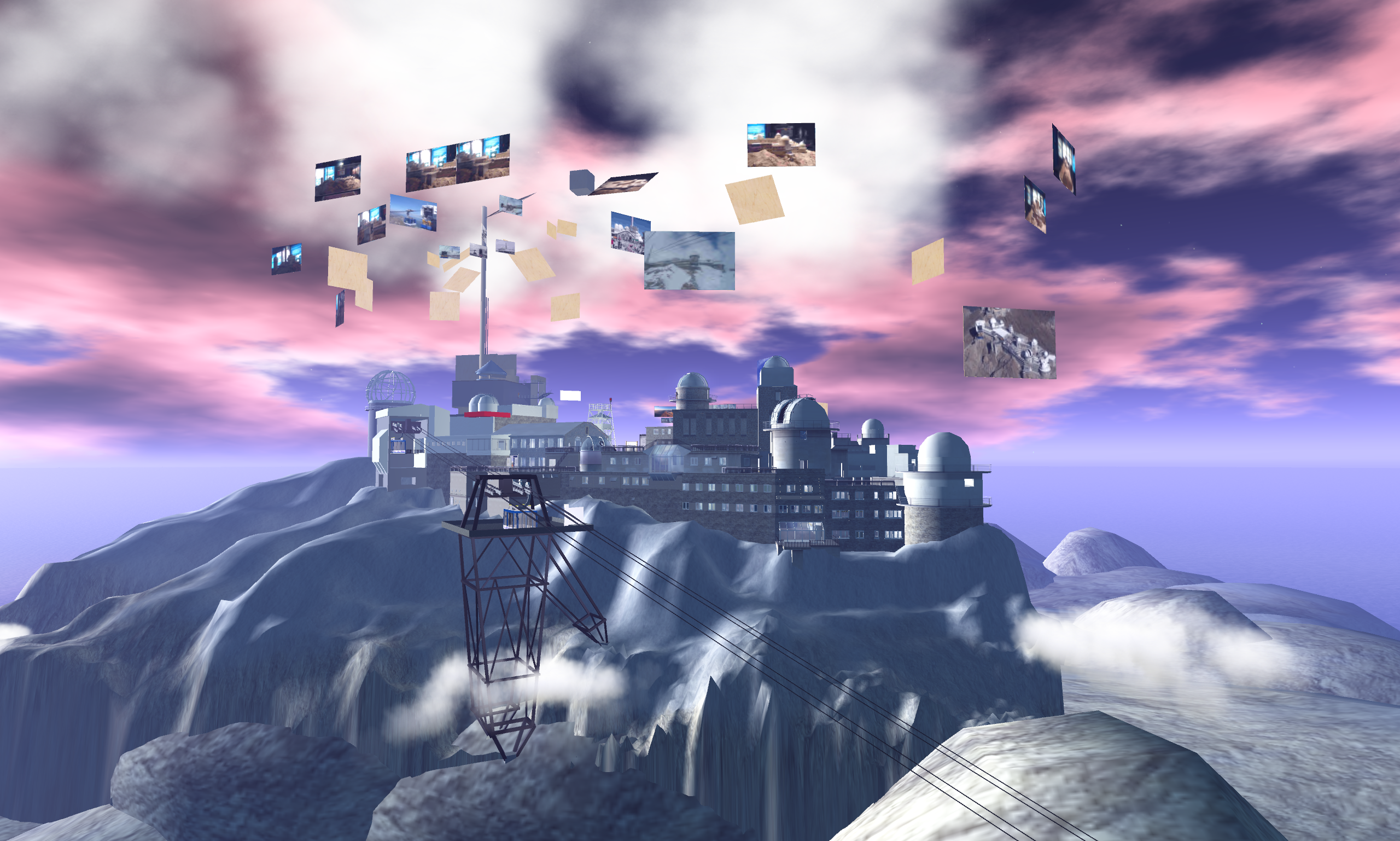
Our Hypergrid Adventurers Club visited a virtual recreation of Pic du Midi de Bigorre in NewWorldGrid this past Sunday.  Follow in our footsteps and check it out for yourself!

Pic du Midi de Biogorre is a mountain in the French Pyrenees famous for its astronomical observatory.

Aime Socrates (who has also built some amazing recreations of nuclear research facilities at CERN and physics education spaces) is building the mountain out as a learning space for students interested in astronomy.

Here are some photos from our journey.

Continue reading

Jibe 1.1: Test our new camera controls at my chicken testing facility.

Jibe 1.1 is now being rolled out!  Here’s more info on what’s new.

We’re very excited about the update.  In addition to some other new features and lots of bugfixes, we’ve expanded how the camera works in Jibe.

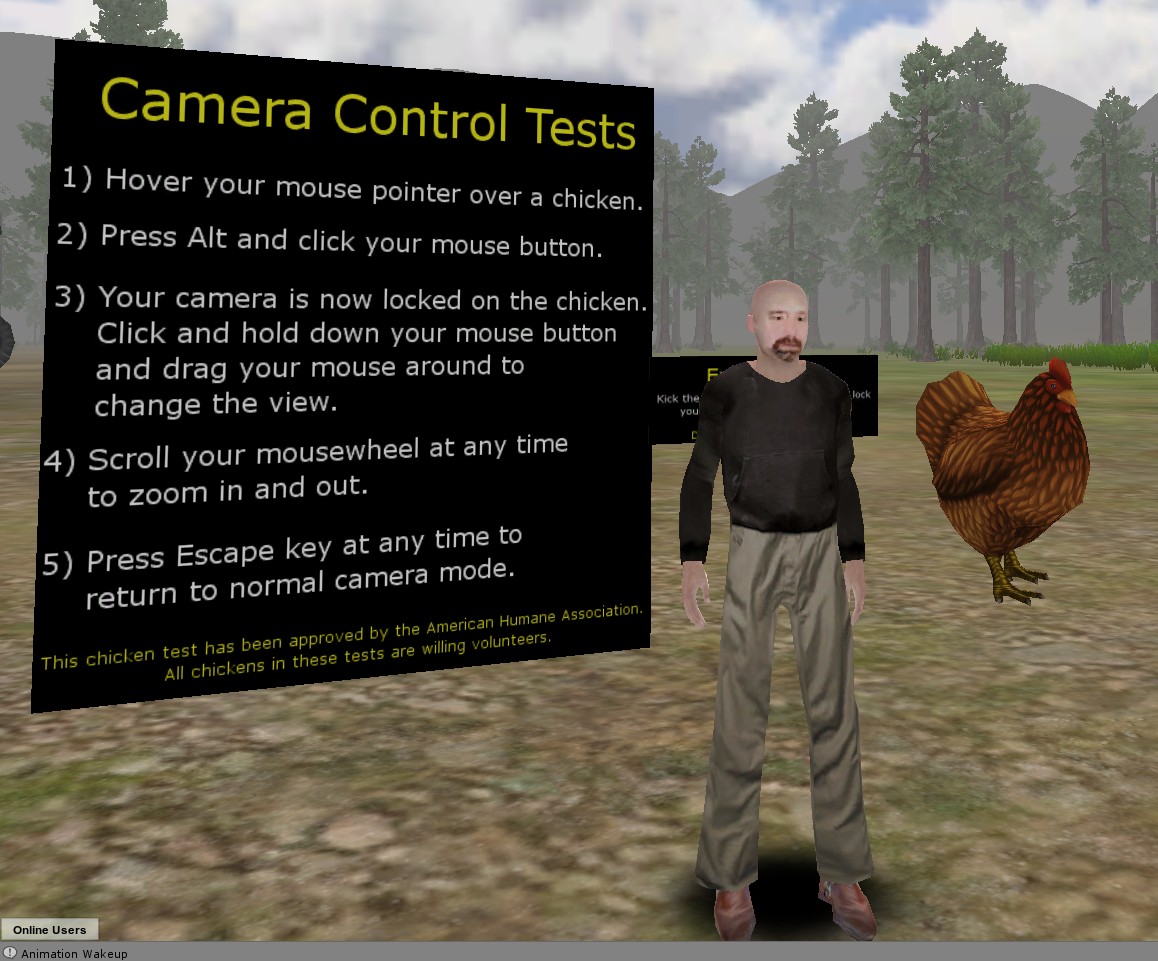
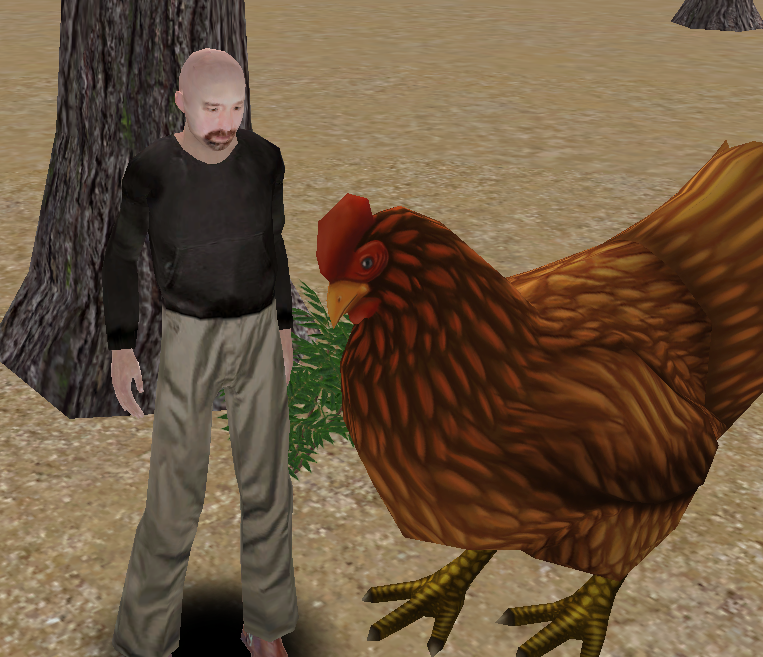
To try out our new camera controls, just visit my Jibe world and look for the big sign and big chickens set up near the default landing area.

No chickens are being harmed in this test. I swear.

The chickens are all making chickeny sounds, and you’ll be able to hear them more clearly as you zoom your camera in on them (your “ears” are attached to your camera).

Please send us a ticket if you have any feedback or notice any bugs.  And for more info about camera controls, be sure to read this page on our wiki.

Thanks, and have fun!

-John “Pathfinder” Lester

Collaborating using web-based tools with Jibe: Animations and iTween

I recently wrote about some of the affordances of having a multiuser virtual world displayed in a webpage.  To illustrate this, here’s an example:

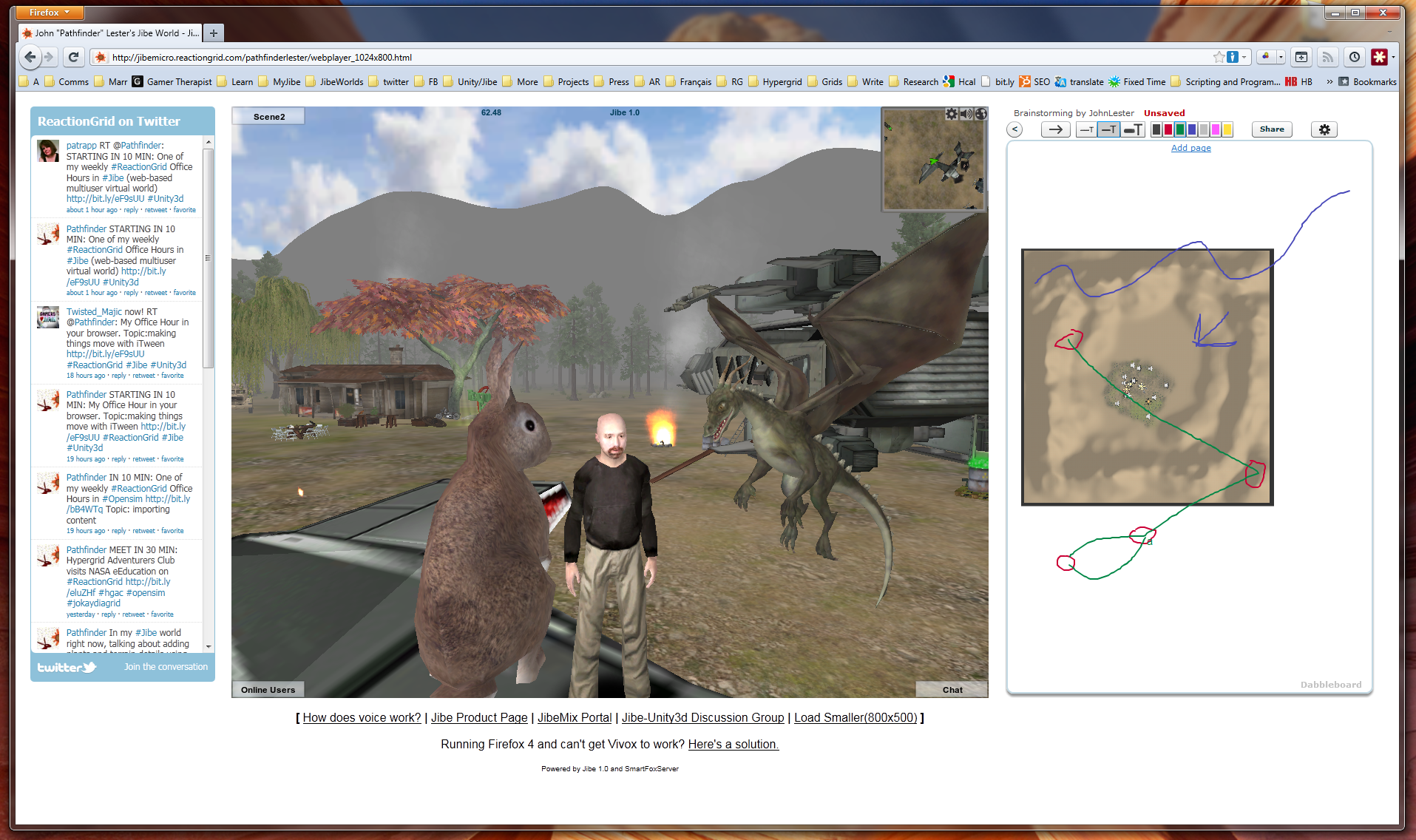
Left to Right: Twitter + Jibe + Dabbleboard

A multiuser Jibe world can be embedded in any webpage.  So what you see in the above screenshot is a webpage that has a Twitter widget on the left, my Jibe world in the middle, and a shared Dabbleboard on the right.  If you’re wondering how I did this, you can simply visit my Jibe page and take a peek at the HTML source.  Pretty simple stuff.

I’ve just started learning how to use a great tool called iTween.  It’s a powerful and easy to use animation system for Unity created by Bob Berkebile, and you can pick it up for free in the Unity Asset Store.  I’ve also been using another free Unity tool called the iTween Visual Editor, created by David Koontz.

These tools allow you to animate and move anything in the Unity editor, which can then be uploaded into a multiuser Jibe world. You create waypoints in the virtual environment and can see lines connecting each waypoint so you can easily visualize the exact path that an object will move along.

I’m a total newbie at all of this, so I love meeting people to discuss ideas and brainstorm.  Recently, I was in my Jibe world and wanted to show someone else my ideas for different pathways I was planning to lay out for my flying dragons.  We walked around my Jibe world together, checking out what I had already set up while talking on voice.

Then I had an idea.  I pulled up an aerial screenshot of my Jibe world’s terrain.  Dropped it into the Dabbleboard.  Drew some lines on it to show my plans for some new pathways.  The person I was meeting with then added some lines and waypoints of their own to the Dabbleboard to illustrate their own ideas.  You can see some of the results in the above screenshot.

Bingo.  Collaboration.

It was a great experience for me to be able to walk and talk with someone while we explored my Jibe world and simultaneously sketched out new ideas.  Really simple, and really powerful.  And a fun way to learn, too.

If you know of any other web-based tools that might integrate nicely on a webpage with Jibe, please let me know in the blog comments or join our conversations in our Jibe-Unity3d Google Group.  Thanks for sharing your ideas!

-John “Pathfinder” Lester

Hypergrid Adventurers Club – Visiting China Town in Francogrid

Our Hypergrid Adventurers Club visited a beautiful region called China Town in Francogrid this past Sunday.  Follow in our footsteps and check it out for yourself!

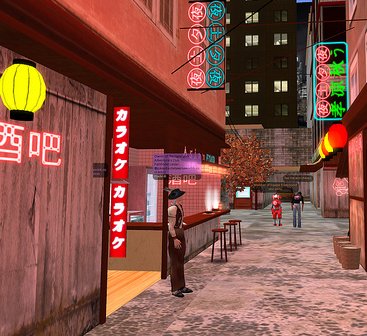
China Town is under construction and being built by Vinc Sonic, but he’s already done a fantastic job of creating a very atmospheric cityspace with lots of detail.

Here are some photos of our journey.

Continue reading

Why a Virtual World on a Webpage is Awesome

Is running a virtual world in a web browser really that big a deal?  If you have to download a browser plugin, then why not just download a standalone application?  What’s the point of having a virtual world sitting in a webpage?  Does it really make any difference?

I hear these questions a lot.  So let me share a few of my recent experiences with Jibe and setting up my own web-based Jibe world.

I need to get folks into my Jibe world quickly.
Ah right, it’s just a URL.

I can’t overstate how powerful it is to be able to give out a URL and tell folks “just click on it and you’ll be in my virtual world.”  And even though they have to download a Unity plugin to make it work, the whole process still happens within the web browser itself.

Think about how much time you spend each day in front of your web browser.  If you’re like most folks, a web browser is probably always open on your computer.  Which means that anything happening in your web browser is always right at hand.

And since my Jibe world is just a URL, I can make it something short and easy for me to remember.  Easy for me to quickly jot down on a piece of paper, too.  I just write or type bit.ly/Jibe_Pathfinder and that’s it.

I need to add links to useful info for people visiting my my Jibe world.
Oh wait, I can just add that as HTML inside the webpage where Jibe lives.

Since my Jibe world lives on a plain old webpage, I can easily add additional text and hyperlinks that appear around the Jibe world on the page.  Tweaking a web page like that is a snap, even for a web-wrangler like myself who uses a pretty basic HTML editor.

I want to use Google Moderator and Dabbleboard with people in Jibe.
Hold on, I can just embed them next to the Jibe world on the webpage.

Again, my Jibe world lives on a plain old webpage.  Which means I can use iframes to embed a useful web-based application and have everyone see it while they are inside my virtual world.  And there are a lot of great web-based collaborative tools out there.

Standing around in a 3d environment looking at 2d documents hanging on virtual walls has always left me scratching my head a bit.  Especially when those 2d documents need to be dynamic and collaborative.  Why not use the right tool for the right job?  Have the 2d content live on the webpage, and have the engaging 3d content in the 3d window.  That gives you the best of both worlds, and both can exist on the same webpage.

I need to track visitors to my Jibe world.  How do I script that inworld?
Oh duh.  I can just add Google Analytics to the webpage where Jibe lives.

Took me about an hour mulling things over before I suddenly realized this one.  A quick copy/paste of the Google Analytics javascript code into my web page, and I was done.

For those of us used to using virtual worlds as standalone applications, you can see how realizing the real power of a virtual world in a webpage requires unlearning some things.  You don’t need to do everything inside the 3d world itself.  You have the power of other web-based applications right there on the same page.

And I haven’t even touched on the more complex affordances of Jibe and the web.  Like being able to tie in preexisting web-based registration systems on the backend.  Or being able to integrate Jibe with a preexisting web-based content or learning management systems.

A virtual world on a webpage is awesome simply because the web is full of awesome tools.

And they can all work together.

-John “Pathfinder” Lester


An Obscured Opportunity: Opensim and Content Creators

Opensim is a compelling platform for virtual world development.  And some new technologies have recently popped up that could potentially make Opensim even more compelling.

Tipodean has launched a preview of their web-based viewer.  And Kitely just opened its doors for people to create on-demand Opensim installations.

Opensim continues to grow, bringing both new opportunities and new challenges.

Content Creators and Opensim – Here There Be Dragons

Opensim poses a very real challenge for content creators who are used to selling and distributing their products in Second Life.  The permissions system in Second Life offers a reasonably decent DRM solution, allowing content creators to specify exactly how their products can or cannot be shared among other people within Second Life itself.  And Linden Lab responds to DMCA takedown notices to deal with illegally copied content that slips through the cracks.

But in Opensim?  Here there be dragons.  Permissions systems can be circumvented by less reputable Opensim grid owners.  Content can flow between grids in ways that strip the original creator’s name from an object’s metadata.  And content can sometimes be found that, while appearing to be freely copyable, is actually being distributed freely without the consent of the original creator.

This situation is not too bad for folks using Opensim as a way to distribute content licensed for creative commons or public domain use.  But for content creators looking for the same DRM safety net that they currently have in Second Life, the situation with Opensim is less than optimal.

These are all technical challenges for the Opensim core developers. Over time I have no doubt we’ll see new types of DRM solutions evolving in Opensim that will put content creators more at ease.  There are also various commercial Opensim grids that have ways of implementing DRM for people selling content within their own grids (the downside being that only users of their grids can use this content).

But I think all this fear of dragons is obscuring a broad opportunity for content creators and Opensim as a whole.

How the Rest of the World deals with the Distribution of 3d Content

Lately, I’ve been spending a lot of time exploring the world of 3d content development outside of Opensim.  I’ve been using Unity3d to develop virtual worlds using ReactionGrid’s web-based Jibe platform.  You can even check out my own Jibe world if you’d like to see what I’ve been building.

With Unity3d, as well as in any other professional 3d development platform, you build environments that use industry-standard mesh models.  There’s a huge amount of commercially available mesh models for folks to purchase on many different commercial websites.  If you need something, and you lack the skills to create it yourself, it’s probably out there for sale somewhere.

And almost none of it has any DRM.

All these mesh-based items for sale typically have very clear and explicit licensing agreements.  But that’s basically it.  Content creators generally rely on legal agreements to protect the use of these creations, not any kind of DRM.

Many professional and hobbyist 3d artists make a good living selling their 3d content on the web in this fashion.  It’s a business model that works.  If it wasn’t, you simply wouldn’t see so many commercial websites selling content like this.

And I personally think it’s a business model that holds a lot of potential for creators of content in Opensim.

If it’s easier and more enjoyable to buy it than to steal it, people will buy it.

The devil is in the details, of course.  You need to create systems that let people easily buy and use content.  Apple and Amazon have learned this, which is why they are very successful at selling DRM-free music.  So have very large and successful 3d content sites like Turbosquid.

The only thing worse than piracy is obscurity

Right now, I see very few people selling DRM-free content for use in Opensim.  Most content creators are probably afraid that any content they sell for use in Opensim might escape out into the wild, or even be copied illegally into Opensim from Second Life without their knowledge.  And that’s a valid concern, absolutely.

But I think the opportunity to sell content to people who want to legitimately buy it and use it in Opensim far outweighs the downside of illegal copies floating around.  Not just in terms of making money from sales that otherwise would never have happened, but also in the fact that you will be building awareness of your brand and content.

And if you discover someone has a pirated copy of your work, definitely file a DMCA takedown notice.  But consider reaching out to such people in more thoughtful and creative ways.  You might be surprised at the results.

Mind the Dragons, but don’t let them Rule you through Fear

At best, DRM helps to keep honest people honest.  If someone really wants to illegally copy 3d content, there’s no technical way to stop them.  That’s simply the technical nature of digital media.  The best way to deal with illegal copies of any kind of digital media is through effective laws and legal process.  DMCA is a step in the right direction, but the legal world still has a ways to go in catching up to the world of digital media.

If you are a content creator and are not comfortable selling any of your 3d content for Opensim use without effective DRM, then by all means don’t do it.  But don’t let your fears obscure your ability to see new opportunities.

Think about dipping your toes in the water and selling some things, or even just giving a few things away for free.  Put up a website that makes it easy for folks to buy and download your products for use in Opensim.  Publicize it.  See how much money you make and how many new customers you get.

Nothing ventured, nothing gained.

-John “Pathfinder” Lester

If you are a content developer and are selling DRM-free content for general use in Opensim, please let me know in the comments.  I’d be happy to add a link to your website in this blog post to help raise awareness of your business.

Encouraging Exploration in Virtual Worlds: The Subtle Power of Sound (and chickens)

One of the most beautiful qualities of virtual worlds is that they are perceptually immersive.

By simulating environments that mirror reality, virtual worlds can evoke in us a surprisingly strong sense of place and space.  We feel like we’re “really there.”

But one thing that is sometimes overlooked in the design of virtual worlds is the fact that we perceive the world not just visually but also through our sense of hearing.

The ambient sound of wind and bird chatter in a forest.  The subtle creak of a wooden floor as we walk across a room.  The cracking of a fire in the distance.

Ambient and contextually relevant sounds can make any virtual world a much more immersive place.  We often don’t notice them consciously.  But when such sounds are absent, we usually feel like something is missing.

My primary interest in virtual worlds is immersive education.  Teaching through storytelling that naturally unfolds as a person explores the world around them.  Encouraging people to discover new things by creating environments that engage them.  And a big part of creating any immersive learning experience is making sure that it is perceptually immersive in as many ways as possible.

Rewarding Explorers

I’m currently spending a lot of time learning how to create multiuser virtual worlds on the web using Jibe and Unity3d.  I’ve been building out my own Jibe world and testing different ways to make it more engaging.

In my experience, the best way to encourage exploration in a virtual world is to simply reward people for exploring it.

I’ve been doing this by placing a few interesting little scenes to discover in my virtual world.  Some of them you will just stumble upon as you walk around.  But others call attention to themselves in subtle ways.

Visual cues, especially movements, are very useful ways to indicate “hey, come over here and check this out!”  But never forget the additional power of sounds.

What was that?  Did you hear something over there?

You may notice that I’ve got a lot of animals in my Jibe world.  This isn’t just because I like animals.  I’ve placed animals everywhere simply because animals both move and make sounds.  And those characteristics in a virtual world make it feel more alive.

Worlds that feel alive are worlds people love to spend time in and explore.

How to add sounds in Jibe and Unity3d

In Jibe and Unity3d, you can embed sound files in any object in the world.  These sounds sources exist in 3d, which means they can be perceived the same way we perceive sounds in the physical world.  Sounds get louder the closer you get to them.  And you hear things spatially when using stereo speakers or headphones.

You can learn all the details of how sounds work in Unity3d by checking out the Unity3d manual entry on sound. But here’s a quick crash course on how to add a basic looping sound to a specific object.

Crash Course in Sound Design: The Chicken

Chickens are awesome.  Visually, they move in very interesting ways.  And they make great sounds.  So I definitely wanted some chickens in my Jibe world.

1) Find a nice animated 3d model of a chicken.

I searched the Unity Asset Store but alas, no chickens.  However, I found a great animated chicken model for sale on the web.  I bought it, downloaded it, and placed it in my Jibe world using the Unity editor.
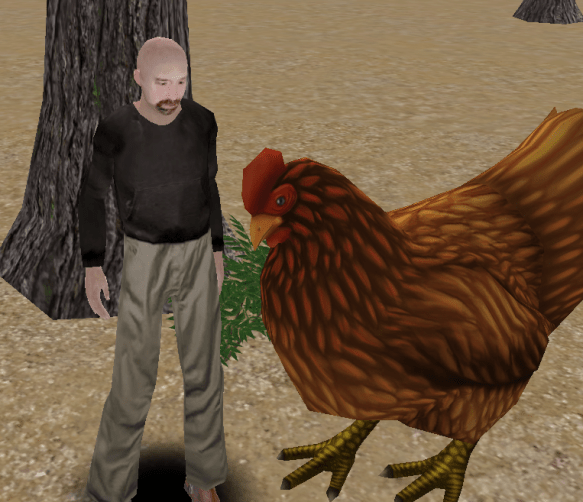
I made her super-sized because I wanted folks to easily see the model detail.  But my chicken lacked sounds.  Bummer.

2) Find a chicken sound.

If you’re looking for sounds that are free and Creative Commons licensed, I highly recommend checking out FreeSound.  I searched FreeSound for chicken sounds and found a nice WAV file of a chicken clucking.

Just one problem.  The sound file was too long and large.  Remember, when you are deploying a Jibe world, size matters.  The more you add to your world in the Unity editor, the slower your Jibe world will load on the web.  Remember this fact when you are adding sound files.  You’ll always want them to be as short and small as possible.

3) Edit the chicken sound.

I love Audacity.  It’s a free and open source program for recording and editing sound files.  So I opened up my chicken WAV file in Audacity and cut it down to a very short clip that looped nicely.  I also saved it in Ogg Vorbis format so it was compressed and as small as possible.

4) Get the chicken sound into my Jibe project file in Unity.

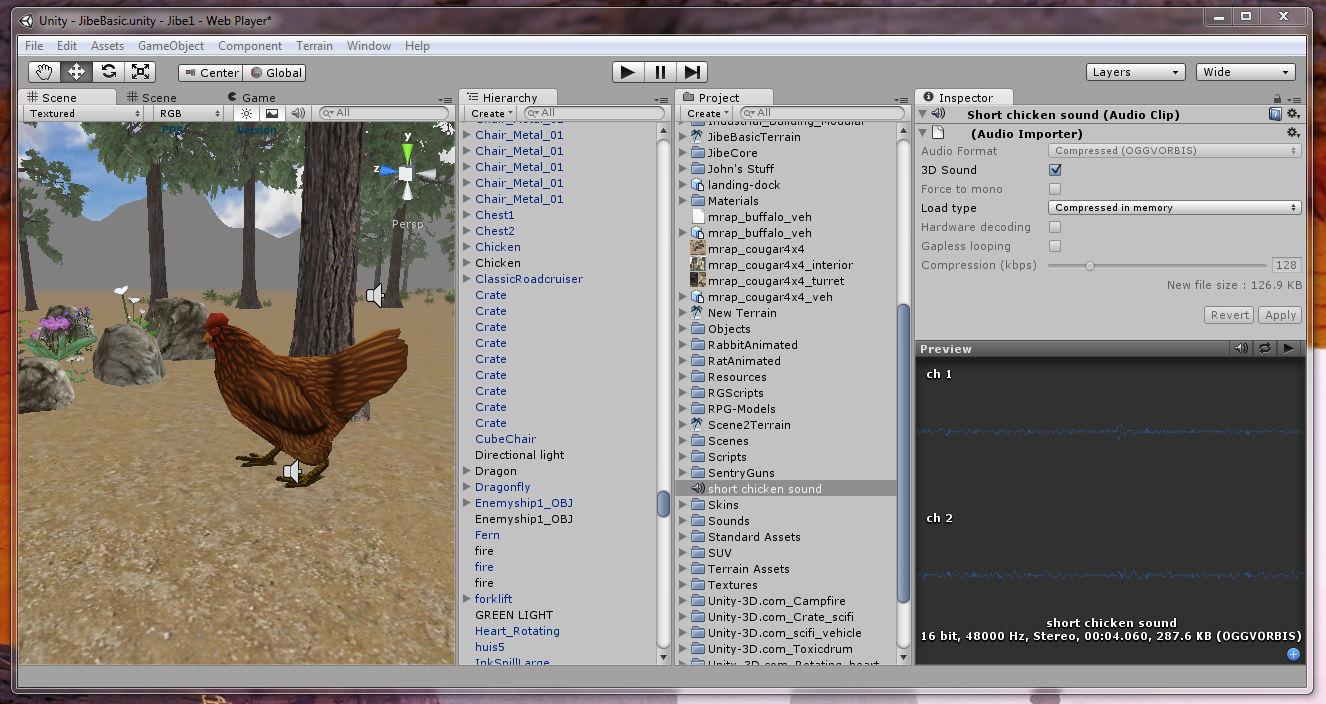
I opened up my Jibe project file in the Unity editor, went the Assets menu at the top of the screen, and chose Import New Asset.  Then I found my chicken sound on my hard drive and selected it.
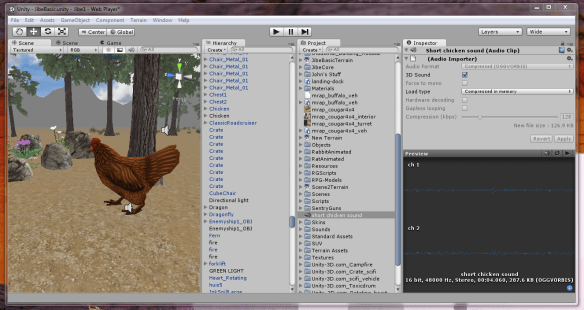
You can now see the short chicken sound file sitting in my Project folder, and the details of the sound file in the Inspector window.

5) Get the chicken sound into the chicken.

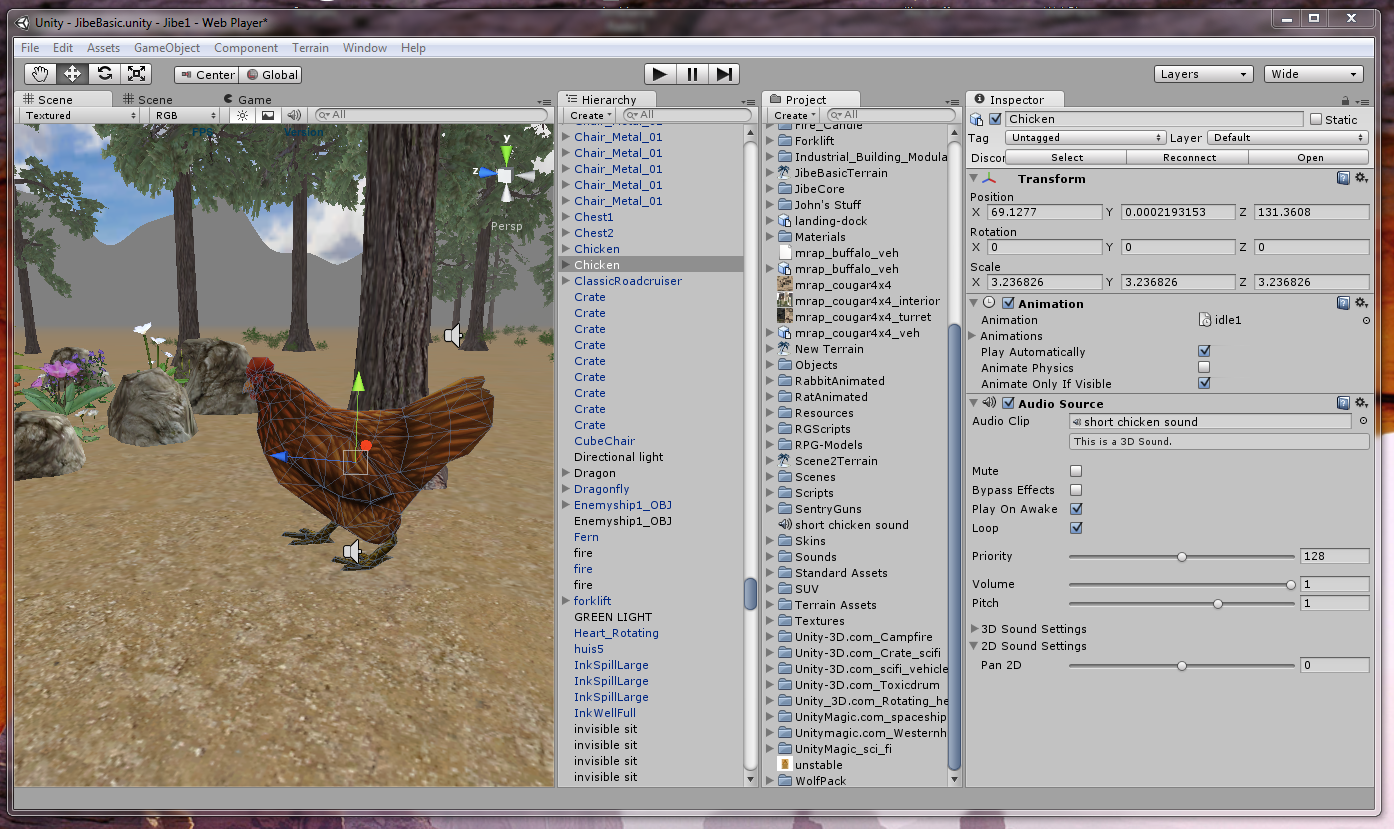
I dragged the short chicken sound file from the Project folder onto the chicken model in my Scene window.  Then I viewed the new details of the chicken model in the Inspector window.
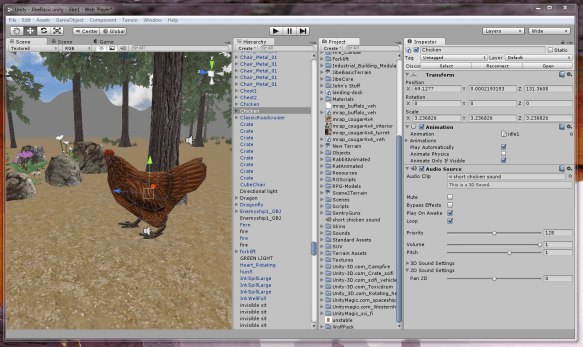
There’s the sound file in my chicken.  I turned on the loop function, and I was done.

6) Enjoy and learn more!

You can visit my chicken in my Jibe world on the web.  And if you’d like to join a community of people interested in creating virtual worlds using Jibe and Unity3d, please check out my Jibe and Unity3 Google Group.

If you are designing a virtual world, spend some time not only thinking about how it should look but also how it should sound.   Got a fire?  Make sure it has a nice crackling sound.  Building a train station?  Add ambient sounds of crowds and trains.  You’ll be giving your users a much richer experience.  And maybe you’ll learn some new tricks along the way.

-John “Pathfinder” Lester